

From Spreadsheets to CMMS: A Practical Guide for Maintenance Teams
Gurpreet Kaur for Click Maint CMMS
Posted 10/27/2026
Introduction – From Spreadsheets to CMMS
Spreadsheets have long been the “go to” work order tracking tool for maintenance teams. They are easy to access, inexpensive to set up, and useful for recording equipment information, maintenance schedules, and repair history. For small maintenance operations, spreadsheets provide a straightforward and familiar way to organize everyday tasks.
However, as maintenance responsibilities grow, spreadsheets become harder to manage. Work orders get overlooked, preventive maintenance schedules fall behind, and equipment records become scattered across multiple files. Maintenance managers spend more time updating information and less time improving equipment reliability.
Transitioning from spreadsheets to a Computerized Maintenance Management System (CMMS) provides a structured approach to managing maintenance operations.
A CMMS brings work orders, equipment records, preventive maintenance schedules, and maintenance inventory into one centralized system. Instead of relying on manual updates, maintenance teams gain better visibility into tasks, priorities, and equipment performance.
This guide explains when to move from spreadsheets to CMMS, how to prepare for the transition, and the practical steps maintenance teams should follow to implement CMMS software successfully.
1. Why Maintenance Teams Outgrow Spreadsheets
Spreadsheets work well when maintenance operations involve a limited number of assets, technicians, and work requests. As facilities expand, however, manual tracking creates operational challenges.
Limited visibility into work orders
When maintenance requests arrive through emails, phone calls, or verbal conversations, technicians and supervisors struggle to maintain accurate records. Spreadsheets don’t automatically notify technicians about new assignments or provide real-time updates on work order progress.
As a result, maintenance managers struggle to answer basic questions:
- Which maintenance requests remain open?
- Who is responsible for each repair?
- Which equipment requires immediate attention?
- How long does it take to complete maintenance tasks?
Without centralized work order management, maintenance backlogs grow and response times become inconsistent.
Difficulty scheduling preventive maintenance
Preventive maintenance is essential for reducing unexpected equipment failures. However, spreadsheet-based maintenance schedules depend on manual updates and reminders. When maintenance managers overlook scheduled inspections, equipment remains exposed to avoidable breakdowns.
Incomplete equipment maintenance history
Equipment maintenance records help teams understand recurring problems, repair costs, and asset reliability. When information is spread across multiple spreadsheets, finding a complete maintenance history becomes time-consuming.
A centralized maintenance system connects repair records, inspections, and preventive maintenance activities to individual assets.
2. 7 Signs Your Maintenance Team Needs CMMS Software
Recognizing when spreadsheets are no longer effective helps organizations avoid unnecessary maintenance delays.
1. Maintenance requests are frequently missed. Requests submitted through emails, spreadsheets, and informal conversations are difficult to track consistently.
2. Preventive maintenance tasks are overdue. Manual scheduling creates gaps in inspections and routine equipment servicing.
3. Technicians lack clear work assignments. Maintenance supervisors spend valuable time communicating task details and following up on progress.
4. Equipment repair history is incomplete. Missing maintenance records make it difficult to identify recurring failures and plan replacements.
5. Inventory is difficult to track. Teams struggle to identify available spare parts, reorder materials, and monitor inventory usage.
6. Reporting requires a lot of manual work. Maintenance managers spend hours preparing reports on completed work orders, equipment downtime, and maintenance costs.
7. Multiple facilities use separate tracking systems. Organizations managing several locations struggle to maintain consistent maintenance procedures.
When these challenges occur regularly, transitioning to CMMS software becomes a practical solution.
3. What is CMMS Software, and How Does It Replace Spreadsheets?
A Computerized Maintenance Management System is software designed to organize, schedule, track, and document maintenance activities. Unlike spreadsheets, which primarily store information, CMMS software supports structured maintenance workflows.
For example, a technician receives a work order assignment, reviews the equipment details, records completed repairs, and updates the work order status within the same system. Maintenance managers then review progress without collecting updates from multiple employees.
Spreadsheet vs. CMMS software
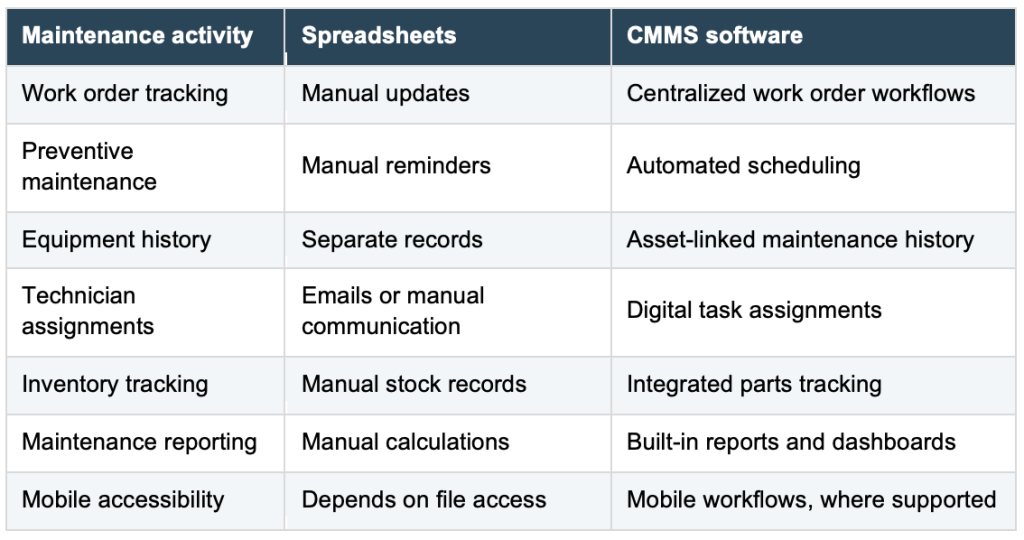
The primary benefit is not simply replacing spreadsheets with another digital tool. It is establishing consistent maintenance processes and improving access to reliable information.
4. Transitioning From Spreadsheets to CMMS Software; What to Prepare?
A successful CMMS implementation begins before software is installed. Maintenance teams should review their existing records, identify operational requirements, and establish clear objectives.
Step 1: Review existing maintenance spreadsheets
Start by collecting the spreadsheets currently used to manage maintenance activities. These typically include equipment registers, preventive maintenance schedules, work order logs, spare parts lists, and maintenance cost records.
Identify duplicate entries, outdated equipment information, and missing details. This process helps prevent inaccurate records from entering the new system.
Step 2: Create a complete asset inventory
A reliable asset register forms the foundation of effective maintenance management.
Each equipment record should include relevant details such as:
- Asset name and identification number
- Equipment location
- Manufacturer and model
- Installation date
- Maintenance requirements
- Criticality or priority level
Accurate asset information helps technicians locate equipment and access maintenance history.
Step 3: Define maintenance priorities
Not every maintenance activity carries the same level of urgency. Identify critical equipment, recurring maintenance problems, safety-related inspections, and tasks that directly affect operations.
Prioritizing essential maintenance activities helps organizations focus their initial CMMS implementation on areas with the greatest operational impact.
5. A Step-by-Step Guide to Implementing CMMS Software
Moving from spreadsheets to CMMS software requires a structured implementation plan.
Step 1: Select software based on maintenance needs
Evaluate software according to daily maintenance requirements rather than the number of available features. For teams transitioning from spreadsheets, important capabilities include work order management, preventive maintenance scheduling, asset tracking, reporting, and mobile access.
Ease of use is particularly important. A complicated system creates adoption challenges for technicians accustomed to simple tracking methods.
Step 2: Import and organize maintenance data
Transfer validated asset records, preventive maintenance schedules, and other essential information into the CMMS.
Begin with a manageable group of assets or one facility. Check imported records for accuracy before expanding the implementation.
Step 3: Configure work order workflows
Establish consistent procedures for submitting, assigning, prioritizing, and completing maintenance requests.
Define responsibilities for maintenance managers, supervisors, technicians, and requesters. Clear workflows reduce confusion and support accountability.
Step 4: Establish preventive maintenance schedules
Configure recurring maintenance activities based on manufacturer recommendations, operating conditions, equipment usage, and regulatory requirements.
Assign responsible technicians and establish completion procedures. Automated scheduling helps maintenance teams manage recurring work without relying on manual spreadsheet reminders.
Step 5: Train employees using real maintenance tasks
Training should focus on everyday activities rather than every software feature.
Show technicians how to receive assignments, review asset information, document repairs, and close work orders. Allow employees to practice with actual maintenance scenarios.
Step 6: Run a pilot implementation
Test the CMMS with a small group of technicians or one maintenance department. Collect feedback, identify workflow problems, and adjust configurations before introducing the software across the organization. A pilot reduces implementation risks and improves employee confidence.
Step 7: Expand gradually
Once the initial team successfully uses the system, introduce additional assets, departments, and facilities. Gradual implementation provides time to improve data quality, training, and operational procedures.

6. Common Mistakes to Avoid When Moving From Spreadsheets to CMMS
Even well-planned implementations face challenges. Understanding common mistakes helps maintenance teams achieve a smoother transition.
Migrating inaccurate data
Importing outdated equipment records and duplicate entries creates confusion. Review and clean existing data before migration.
Introducing too many features at once
Teams transitioning from spreadsheets benefit from starting with essential functions. Focus initially on work orders, asset records, and preventive maintenance. Introduce advanced reporting and inventory workflows as employees become comfortable.
Ignoring technician feedback
Technicians interact with maintenance software daily. Their feedback helps identify unnecessary steps, confusing interfaces, and opportunities to improve workflows.
Failing to assign system ownership
Designate an employee responsible for maintaining asset records, reviewing workflows, and coordinating training. Without clear ownership, data quality and user adoption deteriorate over time.
7. How to Measure Success After CMMS Implementation
A successful transition should produce measurable improvements in maintenance operations. Maintenance managers should establish baseline performance metrics before implementation and review them regularly.
Important maintenance key performance indicators include:
Work order completion rate: Measures the percentage of maintenance tasks completed during a defined period.
Preventive maintenance compliance: Tracks whether scheduled maintenance activities are completed on time.
Mean Time to Repair (MTTR): Measures the average time required to restore equipment after a failure.
Equipment downtime: Tracks periods when equipment is unavailable due to maintenance or breakdowns.
Maintenance backlog: Measures outstanding maintenance work and helps identify resource constraints.
Technician adoption rate: Tracks whether employees consistently use the CMMS to document and complete assigned work.
Reviewing these indicators over several months helps organizations evaluate progress and identify opportunities for improvement.
8. Best Practices for Long-Term CMMS Success
Implementing maintenance management software is only the beginning. Long-term results depend on consistent processes, accurate information, and employee participation.
Maintenance teams should regularly review equipment records, update preventive maintenance schedules, and monitor overdue work orders.
Supervisors should encourage technicians to document completed tasks, equipment problems, labor hours, and replacement parts.
Organizations should also provide refresher training when introducing new employees or modifying maintenance workflows.
Most importantly, maintenance managers should use CMMS reports to support operational decisions rather than treating the software solely as a recordkeeping system. Reliable maintenance data supports better planning, resource allocation, and equipment replacement decisions.
From Spreadsheets to CMMS Conclusion: Building a More Organized Maintenance Operation
Transitioning from spreadsheets to CMMS software represents an important step toward more structured maintenance management. Spreadsheets remain useful for simple tracking requirements. However, growing maintenance teams need reliable processes for managing work orders, preventive maintenance, equipment records, and technician responsibilities.
Successful implementation starts with clean data, clearly defined objectives, practical employee training, and gradual adoption.
By focusing on operational needs rather than unnecessary software complexity, maintenance teams establish a stronger foundation for equipment reliability, accountability, and continuous improvement. The goal is not simply to eliminate spreadsheets. It is to give maintenance professionals the information, processes, and tools required to manage maintenance work efficiently.

Related Articles

How a CMMS Can Reduce Downtime

Benefits of the Checklist Generator in the CMMS System

Practical Maintenance Strategy Design For Capital Expansions

Work Order Prioritization and Risk Assessment

Five CMMS Trends to Look for in 2025

The CMMS: Where Data Goes to Die – Unleashing the Potential of Your Maintenance Digital Backbone