2025 MAS Upgrade Checklist
John Todd, Sr. Business Consultant/Product Researcher, Total Resource Management (TRM)
Posted 8/28/2025
As the end of support for Maximo 7.6 is upon us – September 2025 – now is the time to begin making decisions about how the upgrade from Maximo to MAS should go. As with any upgrade there are many moving pieces to consider. The goal of any upgrade is for the user communities that rely upon the solution to perform their functions without interruption and more efficiently than before. Allow us to provide a 2025 MAS Upgrade Checklist of key elements and decisions to consider as upgrade plans are formed.
Learn as Much as Possible about IBM MAS
This includes finding an implementer who is experienced with not only legacy Maximo, but also with MAS and the new technologies that support it. IBM, directly, and through its business partners has published a significant amount of orientation and learning materials that are freely available. A few examples are:
Maximo User Groups, such as are also excellent sources of real-world experience. Some are for specific industries, yet others are more generic.
Engage with the current (or new) Maximo implementer to have them conduct a series of live demonstrations for the Maximo user communities, stakeholders, and decision-makers. The clearer the picture everyone has about what MAS brings to the organization the better.
Be sure to look at the other MAS components beyond just the Maximo replacement, Manage. Components such as the new MAF/Mobile applications, Monitor, Health, Visual Inspection, etc. add significant value to MAS by expanding well beyond “just,” Manage. While the adoption of these more advanced functions may be in “phase 2,” for the organization, knowing what the bring to the table early in the project has considerable benefit.
Gather Anyone in the Organization Who Touches or Relies Upon Maximo to Review MAS
Given some functions in MAS Manage are the same as those in legacy Maximo 7.6, Users who rely upon them need to be reassured that they will be able to continue to use the system in at least the same way they did before. While many of the functions are the same, there are new functions that could change the way they do business, and of course, the user interface is different. Spend time up front with the user communities to get their buy in from the very beginning.
Through this exercise, it may be discovered that there are competing activities/projects going on that overlap in MAS functionality. It is common for different parts of an organization to go on their own route for solutions rather than communicating to other departments. The result is multiple solutions being implemented, each with the same feature/function set. Avoid this situation by gathering the teams and talking through what they use (or are planning on using) to conduct their business. The outcome of these conversations may be surprising.
Learn about RedHat OpenShift (RHOS)
Even if the organization is going to have MAS hosted in the Cloud, it makes sense to have an awareness of the underlying operating system that is delivering MAS. RHOS is not a new platform, and it is owned by IBM, so there is much to learn.
If the organization is going to host MAS on-prem in their data center, then of course the supporting IT staff must become adept and certified with RHOS. They may already have experience with Linux and that is certainly helpful.
There are opportunities to stand up a sandbox or proof of concept instance of RHOS with or without MAS deployed. Having an actual instance to explore with has great value, especially to the IT staff.
Learn About the Licensing Move to AppPoints
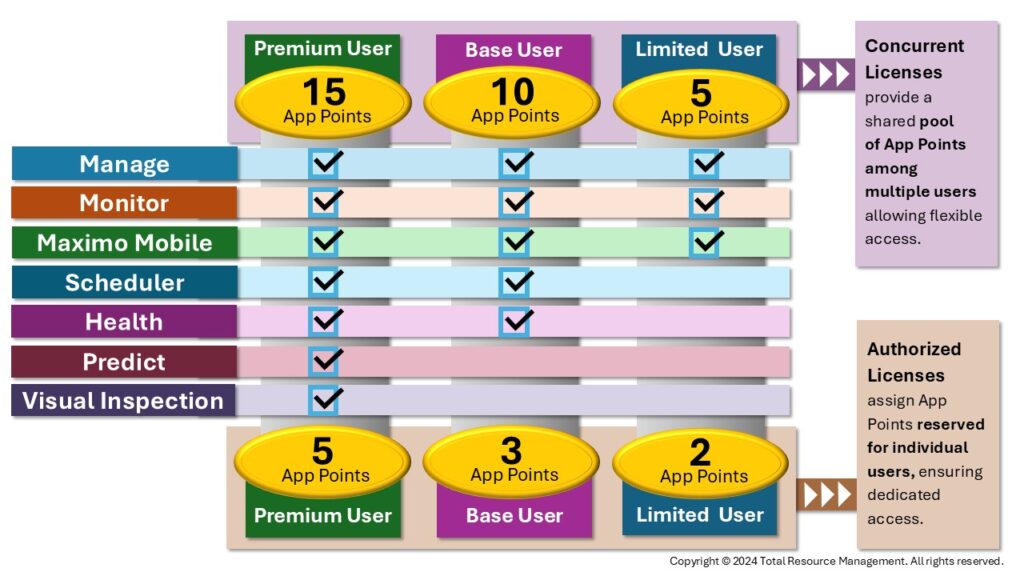
The former approach to licensing Maximo is no longer due to the advent of MAS. Now clients purchase blocks of AppPoints that provide a pool for Users to draw upon when they login and use the components of MAS. AppPoints have the notion of different levels of User access to MAS components, as well as the distinction between authorized (named) and concurrent users.
AppPoints are managed at the MAS level and those settings impact what the User can see/do at the component level of MAS (Manage, Monitor, Health, etc.)
Very early in the decision-making process it is important to work with an IBM business partner or whoever provides the licenses for the Maximo instance, to develop the conversion approach. There are many options and benefits to converting to AppPoints, but it will take a few cycles to get them just right.
Evaluate the Current Maximo Environment(s)
This is a big task as there are several elements to be considered. It is true, with rare exception, any business rules/scripts, Java class customizations, custom applications, reports, and interfaces are all considered during the MAS upgrade process. They will appear as expected in the new MAS Manage instance. However, prudence would dictate that having comprehensive current Maximo system configuration documentation in hand will set the stage for testing of the new environment.
The focus of the evaluation should be around any customizations or business rules that are no longer needed due to changes in the business, or because new features/functions in MAS may replace them. Are any of the gymnastics that were constructed into Maximo years ago still needed to suit the business?
Specific to interfaces, what will be the impact of the new RHOS/MAS environment on their design and connectivity? Will some of the new functionality in MAS replace the need for some external systems and their interfaces? Should the interfaces be redesigned to use the published APIs that MAS provides?
Review all Related Business Processes for Potential Improvements
It could be argued that the upgrade to MAS should simply be a technical upgrade where nothing changes from a process standpoint. However, any upgrade is an excellent opportunity to improve current processes. Just because the current system is in good support of the business processes, does not mean that the organization is “stuck” with how the system is configured.
Take the time to walk through the business processes in the light of where and how the solution interacts or facilitates the process. Large swaths of process activities may be deemed no longer needed so they can be left behind.
This step could occur soon after the implementation and go-live of MAS if there is certainty that the existing processes are reasonably “good.” It might take a little time after going live for things to settle down, providing time for the users to consider process changes in the light of their new system.
Consider Data Archival
If the current Maximo environment has years of transactional data, which they all do, part of the upgrade project might include the opportunity to archive all that valuable information into a data warehouse of some kind. There is no need to drag all that data into the new MAS system.
A data repository with sufficient data extraction and analysis tools (IBM Cognos, Microsoft PowerBI, Tableau, etc.) gives the user communities access to their historical data as needed, yet “clears the decks” for the new MAS system. Yes, establishing a system of this sort can easily be a project unto itself, so care is needed to ensure the scope is correct and well understood.
If the instance of MAS is moving to the cloud, the size of the database becomes an element in the decision process. If the underlying database is also to be hosted, there is a cost for the additional storage. There will be a cost to bring all those years of transactional data into the new system. It may be financially beneficial to have the archive and the analysis tools on-prem data center servers.
Consider Moving from On-prem to the Cloud
This is the big decision. Given the MAS implementation involves standing up a new instance, not just upgrading in place, there is an opportunity to decide where the cost(s) of hosting should reside. Staying on-prem is perfectly valid as long as the supporting IT staff has or will gain experience with RHOS. Further, the ability to stand up a separate set of servers or virtual machines in the local data center and connecting them to the corporate network is critical. Security scans and procedures must also be determined for the new environment. In addition, interfaces will need to be maintained as well.
Shipping all this off to the Cloud for someone else to manage may be disconcerting at first. It comes down to a financial decision: Is it more beneficial to have MAS running in an environment that is largely managed by a vendor (like TRM) who meets contracted Service Level Agreements (SLAs) or is it less costly to keep the MAS instance in the local data center. Don’t forget that the typical Maximo environment has three systems: Development, Test, and Production. These can all be hosted in the Cloud, using a few techniques to keep the costs reasonable.
Certainly, a knowledgeable vendor such as TRM can help you “run the numbers,” and come up with a clear winner. Going to the Cloud is not always the winner for several reasons, but it has been for many clients for an equal number of other reasons.
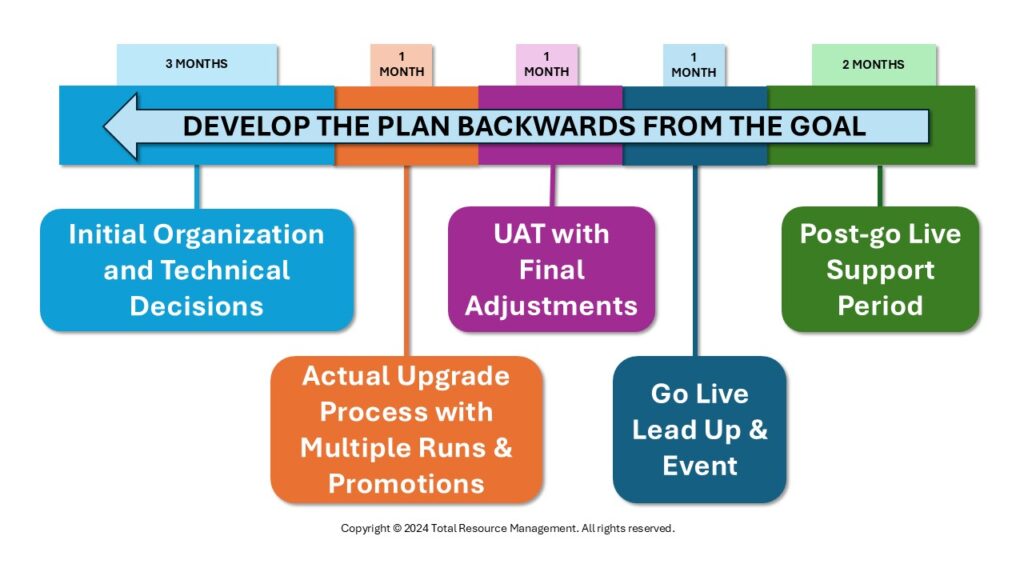
Develop a High-level Schedule that Works Backwards from the Required MAS “Go-Live” Date
There may be business drivers that dictate when the MAS go-live must occur. Maybe it must wait for the next financial period (which infers that budgeting for the MAS upgrade will need to occur prior to the new period). The schedules of those who should be involved may dictate a more phased approach. Seasonal issues such as the weather or business cycles may also narrow the window for a transition from old to new.
This does not need to be an overly detailed 6–9-month schedule, but it should include elements such as:
- Post-go live support period = 2 months
- Go live lead up and event = 1 month
- UAT with final adjustments = 1 month
- Actual upgrade process with multiple runs and promotions = 1 month
- Initial organization and technical decisions = 2-3 months
Wrap Up: 2025 MAS Upgrade Checklist
TRM has been helping organizations deploy and maintain the IBM Maximo solution for over 30 years. We were an early adopter of IBM MAS, so we now have several years performing upgrades not only to our Cloud services, but on-premises as well. Further, TRM has many years of experience in assisting in process improvement efforts both big and small. Contact us to see how we might be able to help you with your Maximo to MAS upgrade.

John Q. Todd
John Q. Todd has nearly 30 years of business and technical experience in the Project Management, Process development/improvement, Quality/ISO/CMMI Management, Technical Training, Reliability Engineering, Maintenance, Application development, Risk Management, & Enterprise Asset Management fields. His experience includes work as a Reliability Engineer & RCM implementer for NASA/JPL Deep Space Network, as well as numerous customer projects and consulting activities as a reliability and spares analysis expert. He is a Sr. Business Consultant and Product Researcher with Total Resource Management, an an IBM Gold Business Partner – focused on the market-leading EAM solution, Maximo, specializes in improving asset and operational performance by delivering strategic consulting services with world class functional and technical expertise.

Related Articles

Professional Development: Driving the Economic Engine

Repowering or Replacement: What Is the Solution?

Linear and Nonlinear Vibrations

Why Some Root Cause Investigations Don't Prevent Recurrence

What is Preventive Maintenance? A Comprehensive Guide